

Playing Aion 2 on the TW servers
Step-by-step guide to get started on Aion 2.
 by Iruminati
Introduction
Aion 2, NCSoft’s highly anticipated MMORPG, is already playable on the Korean and Taiwanese servers. The official Western release is scheduled for September 17, 2026.
Don’t want to wait ? You can play right now on the Taiwan servers, where the international community gathers.
The game is available in English. This guide explains, step by step, how to create your account and launch Aion 2 on Taiwan.
1Before you start
To play the Taiwanese version, you need an NCSOFT account, the NC Purple launcher and a VPN, now mandatory. A valid phone number is also required : it is verified on first login to the server.
Choosing a server:
Two servers gather the community : Bakarma on the Elyos side and Kromede on the Asmodian side. The international population is more present on Kromede.
2Creating the NCSOFT Taiwan account
This account lets you log in to NCSOFT’s « Purple » launcher. You will launch the game through this launcher.
Step 1: Go to the NCSOFT sign-up site by clicking this link.
Step 2 : create the account with your Google account by clicking the « Google » icon.

Step 3: Tick the box then click the blue button.

Step 4: Make sure your location is set to « Taiwan ». Enter your date of birth – you must be over 18 – and click the « Next » button.

Step 5: Tick the required boxes then click the « Accept all » button.

3Download the launcher and the game
Next, you’ll need to download the NC Purple launcher. You can find the launcher link here.
Installation is straightforward with the « Download » button at the top right.
Once the launcher is open, log in to your NCSOFT account. The « Taiwan » region no longer exists in the launcher : select the « Global » region.

Once logged in, Aion 2 appears on the launcher’s home page. Download the game, then launch it via the button at the bottom right.

4The VPN – LagoFast & ExitLag
A VPN is now mandatory to play Aion 2 on the Taiwanese servers. Without a connection routed through Taiwan, you won’t be able to connect to the game.
Software that routes your connection through Taiwan is therefore essential: it gives you access to the game while clearly improving smoothness (reduced ping).
Only the apps you select go through the VPN: Aion 2 will be on Taiwan, the rest of your computer stays in your home country.
LagoFast – the recommended option
LagoFast goes further than a simple VPN. On top of routing your connection through Taiwan and reducing your ping, the tool includes features designed for Aion 2:
- In-game translation in one click
- Built-in DPS Meter : real-time damage tracking, non-intrusive
- PVE combat power lookup built right in
- Free TW account for Premium members, plus a phone-verification assistant
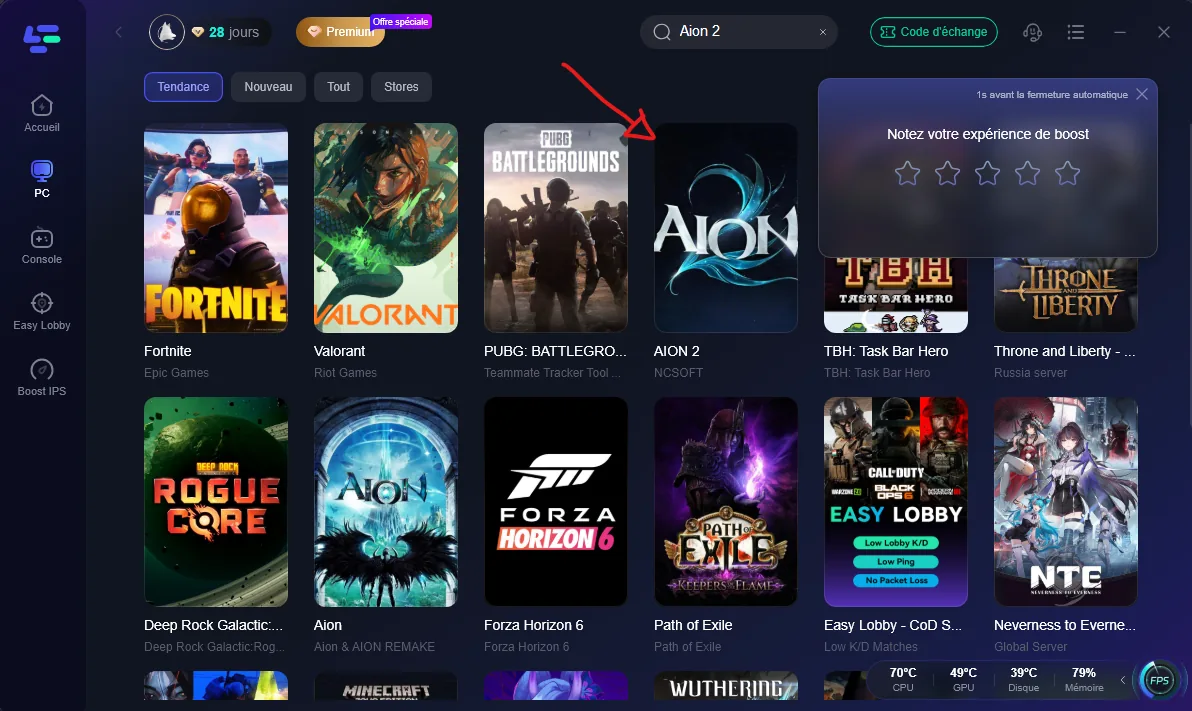
Setup is simple: search for « Aion 2 » in the list of games.
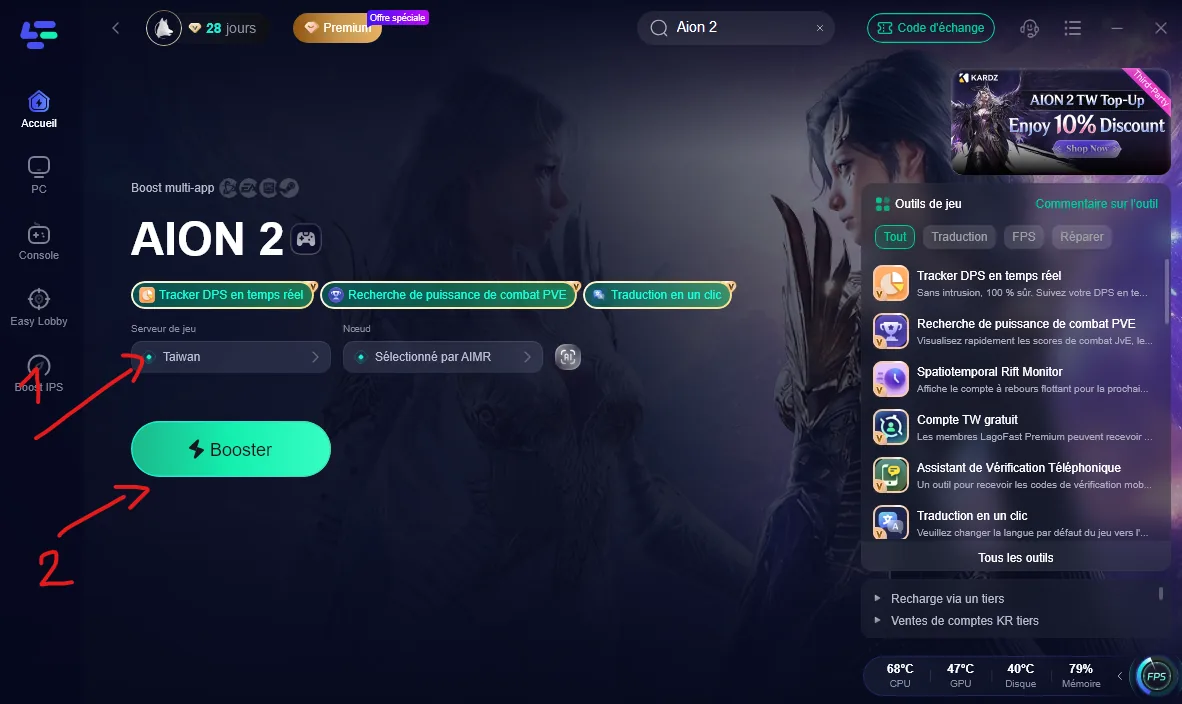
Then select the « Taiwan » server, click « Boost », then enable the tools you want (DPS, translation). Remember to repeat the operation for the NC Purple launcher.
ExitLag – the alternative
If you prefer, ExitLag is another valid option. Buy and download it via this link. (Affiliate link: I get a small commission on each sign-up, thanks for your support.)
Once installed, here are the steps to follow:
1. Click the « Add » button in the connections bar

2. Search for the launcher name « NC PURPLE ».

3. Choose a server

4. Two choices are possible: Manual or Automatic. Both work. I recommend Automatic mode with region selection: the route is optimized for the lowest ping.

Conclusion
Congratulations, you’re ready for your adventure on Aion 2!